AI Meeting Assistant Without a Bot: How It Works
Most AI meeting tools work the same way: a bot joins your call as an extra participant, records it, and sends notes afterwards. It works. It also changes the meeting. A name appears in the participant list, a recording notice pops up, and clients start choosing their words more carefully, or ask for the bot to leave.
There is another way to build a meeting assistant, and it is worth understanding before you choose one.
Two ways to hear a meeting
A bot in the call. The tool connects to Zoom, Teams or Meet as a participant. It hears what every participant hears, because it is one. Everyone can see it, and many organisations block unknown bots outright.
An assistant on your computer. The tool runs on your own Mac or in your browser and listens to the audio your computer is already playing, plus your microphone. Nothing joins the call. To everyone else in the meeting it is invisible, the same as a notepad on your desk.
What changes when there is no bot
- No awkward start. There is nothing to explain, nothing for a client to ask about, and no approval needed from the other side's IT team.
- It works with any call app. Because it listens to your computer rather than connecting to a platform, it works with Zoom, Teams, Meet, Webex, Slack huddles and anything in a browser.
- It works in the room. An in-person meeting has no call to join. An assistant on your laptop can still hear it through the microphone.
- It can help during the meeting, not only after it. A bot sends notes when the call ends. An assistant on your screen can show you something while the conversation is still happening.
What to ask any bot-free assistant
- Is the audio stored? Look for live audio that is transcribed in real time and not kept as a recording.
- Is my data used for training? The answer should be a plain no.
- Can it see my past meetings? An assistant that only hears the current call can summarise. One that remembers your past meetings can tell you what was agreed last time.
- Does it say where an answer came from? If it puts something on your screen, you should know whether it came from a past meeting, a document or general knowledge.
How Easen does it
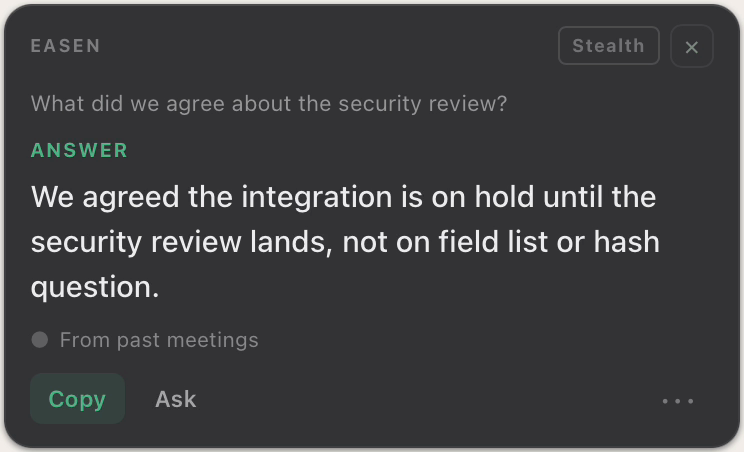
Easen runs on your Mac or in your browser and never joins the call. Before a meeting it briefs you on what you agreed last time and what each side still owes. During it, when you are asked something, it puts the answer on your screen from your own past meetings and documents, and labels the source. Afterwards it keeps the decisions and commitments, per person. Live audio is transcribed in real time and never saved, and Easen never trains AI models on your meetings.
Easen works alongside Zoom, Teams, Meet and meetings in the room, with no bot in the call.
See how it stays privateFAQ
Can other people in the meeting see a bot-free AI assistant?
No. It runs on your own computer and does not join the call, so it does not appear in the participant list.
Do I need to tell people I'm using an AI meeting assistant?
Recording and consent rules vary by place and by organisation. Check the rules that apply to you, and when in doubt, say so at the start of the meeting.
Try Easen in your next meeting
Real-time suggestions, automatic summaries, and searchable memory, free for 7 days, no card required.
Start free