AI integrations
Your meetings, inside the AI you already use.
Connect Easen to Claude, ChatGPT or any app that supports MCP connectors, and ask it about your meetings, decisions and commitments. It can read your records and never change them.
Free for 7 days. No card needed. Part of Professional, and included in the trial.
What does Priya still owe me?
Priya Raman still owes you three things:
- A realistic completion date for the timeline document
- A believable timeline date for you
- The updated field list for reviewers, due October 15
From Easen: 3 commitments, 2 meetings
No more filling in the gaps
Your AI already knows what was said.
Without Easen
- Export a transcript
- Paste it into a chat
- Explain who is who
- Do it all again next week
With Easen
Just ask.
Your AI reads your Easen records directly, so it starts with the meeting, the people and the history.
Things to ask
Ask about any meeting. Or every meeting at once.
“What did we agree with Northwind about the security review?”
“What do I owe people this week, and is anything overdue?”
“Find my last meeting with Priya Raman and summarise the decisions.”
“Quote exactly what Priya promised in the data mapping meeting.”
“What is being said in my meeting right now, and what should I say?”
“Draft the follow-up for the meeting I just finished.”
The details
What your AI can read. And nothing it can change.
Ask Easen
Answers a question across your meetings, with the meetings it used.
Search meetings
Finds meetings by topic, person or date.
A meeting
One meeting's summary, decisions, action items and open questions.
The transcript
What was said, word for word.
Commitments
What you owe people and what they owe you, with due dates.
The meeting in progress
Only when you turn on Live meeting access. Interviews are never shared.
In practice
Set up in a minute
- 01
Open your AI app's connectors
In Claude: Settings, Connectors, Add custom connector.
- 02
Paste the Easen address
mcp.easen.ai/mcp
- 03
Sign in to Easen
Allow access. Disconnect any time in Easen's Settings.
- 04
Ask
About any meeting, or all of them at once.
Next: Live answers
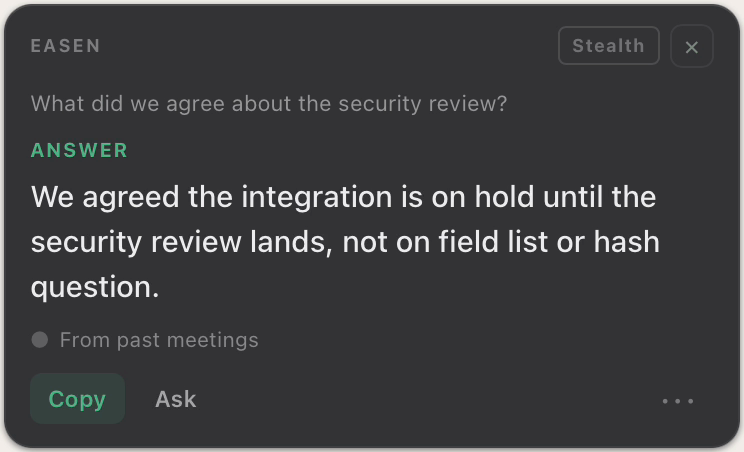
The right words, while they're still asking.
When a question lands in your meeting, Easen answers it from your own past meetings, and shows you where the answer came from.
Walk into your next meeting already knowing.
Free for 7 days. No card needed.